The ultimate Mac dock? Ivanky unveils a 26-port Apple Silicon powerhouse that Windows users can't use
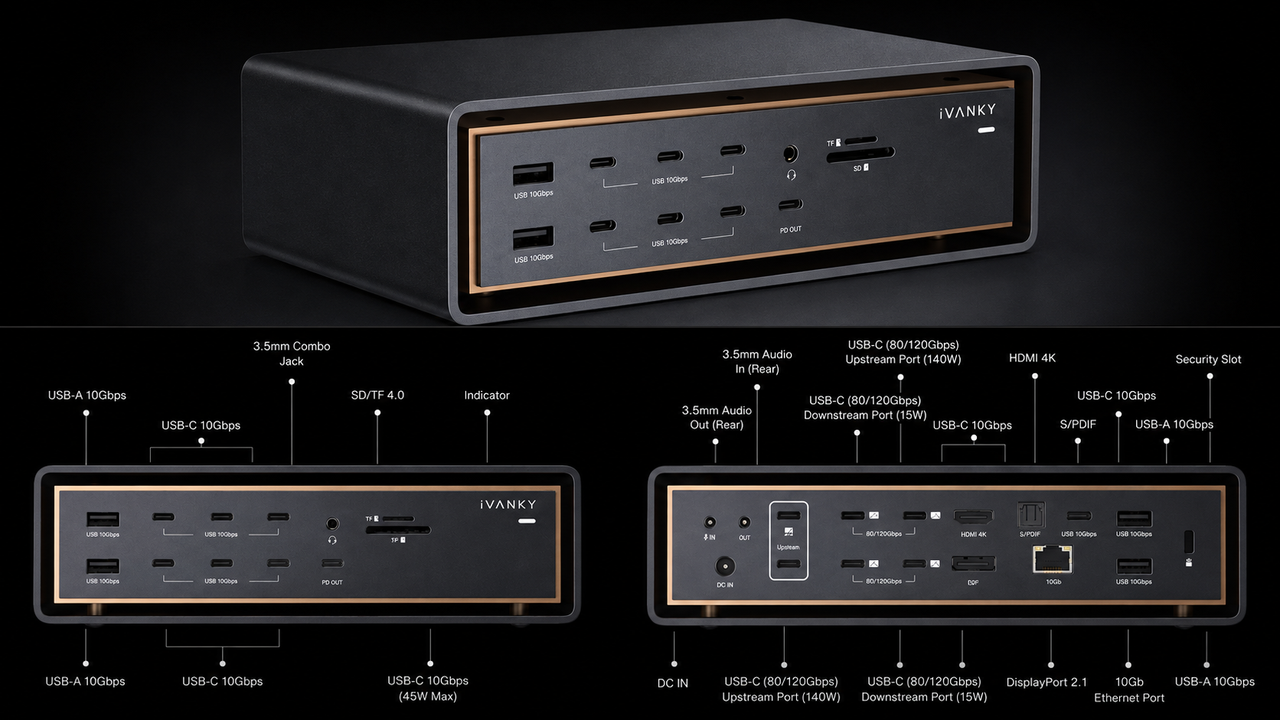
iVANKY FusionDock Ultra packs 26 ports into a desktop workstation dock Four external 6K displays can run natively on compatible Apple Silicon Macs Up to 120Gbps bandwidth supports demanding display-focused professional workflows simultaneously The iVANKY FusionDock Ultra is a 26-port desktop dock de
<![CDATA[ <article> <ul><li><strong>iVANKY</strong> <strong>FusionDock Ultra packs 26 ports into a desktop workstation dock</strong></li><li><strong>Four external 6K displays can run natively on compatible Apple Silicon Macs</strong></li><li><strong>Up to 120Gbps bandwidth supports demanding display-focused professional workflows simultaneously</strong></li></ul><p>The iVANKY FusionDock Ultra is a 26-port desktop dock designed specifically for Apple Silicon Macs and demanding professional workstations.</p><p>The company says its dock<strong> </strong>supports native quad 6K<strong> </strong><a href="https://www.techradar.com/news/computing-components/peripherals/best-monitor-9-reviewed-and-rated-1058662">monitors</a>, high-speed connectivity, and charging capabilities for professional users.</p><p>Unlike many universal <a href="https://www.techradar.com/news/the-best-laptop-docking-stations">docking stations</a>, this model does not support Windows PCs, Intel Macs, or Chromebooks, limiting its audience considerably.</p><h2 id="built-around-high-end-apple-silicon-workstations">Built around high-end Apple Silicon workstations</h2><p>The dock uses a dual-chip architecture intended to keep multiple displays, storage devices, networking equipment, and peripherals operating simultaneously under sustained professional workloads.</p><p>It supports up to 80Gbps bidirectional bandwidth, while display-heavy configurations can reach 120Gbps through asymmetric data allocation across connected devices.</p><p>An included 80Gbps active cable is designed to support the connection speeds required by demanding storage and multi-display workflows during professional production sessions.</p><p>On compatible Apple Silicon systems, the dock can drive four external 6K displays without relying on DisplayLink or third-party display drivers.</p><p>However, the number of supported screens, resolutions, and refresh rates still depends on the specific Mac chip and connected monitors.</p><p>That native approach may appeal to creators who want additional displays without introducing another software layer into their macOS <a href="https://www.techradar.com/best/best-workstations">workstation</a>.</p><p>Apple's hardware limitations are not bypassed, meaning buyers still need a compatible Mac capable of supporting their intended display configuration.</p><p>The dock also provides 10Gb Ethernet, giving users a high-speed wired connection for network storage, shared files, and other demanding workflows.</p><p>Its 26 ports include USB-C and USB-A connections, DisplayPort 2.1, HDMI 2.0, UHS-II card readers, and optical audio.</p><p>It features front and rear 3.5mm audio connections, allowing microphones, headphones, speakers, and other audio equipment to remain connected.</p><p>The magnetically articulated dual-cable connectors are designed to accommodate different Apple Silicon computers, including MacBook Pro, Mac mini, and Mac Studio.</p><h2 id="cooling-and-power-for-extended-workloads">Cooling and power for extended workloads</h2><p>Power delivery is another major part of the dock, with up to 140W available for compatible MacBook Pro systems during demanding workloads.</p><p>A separate 45W USB-C power-delivery port can charge devices such as an iPad, iPhone, or another compatible accessory.</p><p>The cooling system combines passive heat dissipation with two adaptive fans that increase cooling activity as workloads become heavier.</p><p>iVANKY claims noise levels of 44 to 46 dBA at one centimeter under controlled conditions, with lower noise expected farther away.</p><p>That cooling design is intended to maintain stable connections and performance during extended sessions involving displays, storage, networking, and other peripherals.</p><p>At a promotional price of $649.99, reduced from an RRP of $749.99, the FusionDock Ultra enters an expensive docking market.</p><p>The company says the current price represents a 13% discount, although buyers should consider their actual requirements before paying for its extensive connectivity.</p><p>If you are not running an Apple Silicon Mac, this particular dock was never really built with you in mind.</p><p>Windows users, Intel Mac owners, and Chromebook owners are shut out entirely, regardless of how much they might want in. </p><figure class="van-image-figure inline-layout" data-bordeaux-image-check ><div class='image-full-width-wrapper'><div class='image-widthsetter' style="max-width:676px;"><p class="vanilla-image-block" style="padding-top:31.51%;"><img id="diM9tpwF2Lz85R8q85CT78" name="tr-g_news" alt="Google logo on a black background next to text reading 'Click to follow TechRadar'" src="https://cdn.mos.cms.futurecdn.net/diM9tpwF2Lz85R8q85CT78.jpg" mos="" align="middle" fullscreen="" width="676" height="213" attribution="" endorsement="" class="inline"></p></div></div></figure> </article> ]]>
Read the full article on TechRadar
Read Full Article →