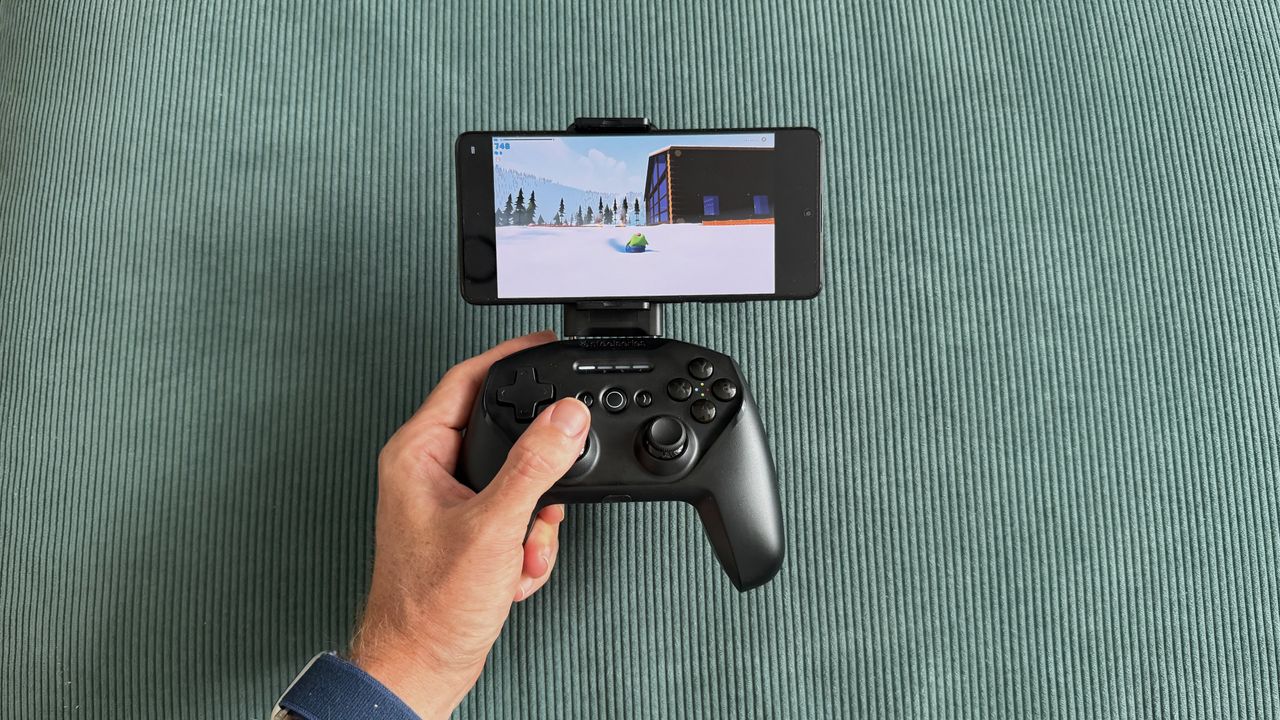
I've spent a bunch of time with the SteelSeries Stratus+, and it’s OK on PC but struggles on Android
The SteelSeries Stratus+ is a wireless Bluetooth controller built primarily for Android mobile gaming, with wired USB-C support for Windows PCs.
<![CDATA[ <article> <p>The SteelSeries Stratus+ is a wireless Bluetooth controller built primarily for Android mobile gaming, with wired USB-C support for Windows PCs. </p><p>It launched back in 2022 at $59.99 / £64.99, but has since tumbled to sale prices around $25 / £25. It’s a welcome price drop because it’s about the only thing that keeps it in with a shot of being worth picking up, and on the periphery of the <a href="https://www.techradar.com/gaming/best-mobile-controllers">best mobile controller</a> conversation — but only just. </p><p>SteelSeries positions the Stratus+ as delivering a console-quality mobile experience, and in theory, it has most of the ingredients to do that. A traditional shape that blends Xbox and PlayStation design elements with a removable phone mount, Hall Effect triggers, and a claimed 90-hour battery life via Bluetooth LE. In practice, however, the phone mount that should be the controller's defining feature ends up being its biggest weakness. It’s tricky to install, and once it’s in, it wobbles, spoils the balance, and worst of all, it has a habit of turning your phone off altogether. </p><p>Once you have found the sweet spot to mount your phone, game compatibility is then a mixed bag. <em>Fortnite </em>on mobile is often kind on controller compatibility and worked well here, but more finicky titles like <em>Call of Duty Mobile</em> and <em>Need for Speed</em> didn't work at all. Xbox Cloud Gaming fared better, performing well enough with <a href="https://www.techradar.com/gaming/forza-horizon-6-review"><em>Forza Horizon 6</em></a>, though compounding Bluetooth latency with remote gaming meant noticeable enough input lag that it forced me into pre-empting inputs rather than driving naturally.</p><p>For a mobile controller, the Stratus+ actually performs best as a wired <a href="https://www.techradar.com/best/best-pc-controllers">PC controller</a>. Plug it in via USB-C, and it's instantly recognized as an XInput device, fully mapped in Steam, and perfectly functional as a basic controller. The problem is that it's a particularly competitive market, and it does very little to stand out. You could pick up an actual <a href="https://www.techradar.com/reviews/xbox-wireless-controller-2020">Xbox Wireless Controller</a> for not much more and get a better, more comfortable pad that still pairs to your Android phone. </p><figure class="van-image-figure inline-layout" data-bordeaux-image-check ><div class='image-full-width-wrapper'><div class='image-widthsetter' style="max-width:4000px;"><p class="vanilla-image-block" style="padding-top:56.25%;"><img id="7SBxAAFijL9NpA5Rjqhgk3" name="SteelSeries-Stratus-8" alt="The SteelSeries Stratus+ mobile and PC controller on top of a green carpet surface" src="https://cdn.mos.cms.futurecdn.net/7SBxAAFijL9NpA5Rjqhgk3.jpg" mos="" align="middle" fullscreen="" width="4000" height="2250" attribution="" endorsement="" class="inline"></p></div></div><figcaption itemprop="caption description" class=" inline-layout"><span class="credit" itemprop="copyrightHolder">(Image credit: Future/Alex Berry)</span></figcaption></figure><h3 class="article-body__section" id="section-steelseries-stratus-review-price-and-availability"><span>SteelSeries Stratus+ review: Price and availability</span></h3><ul><li><strong>List price: $59.99 / £64.99 / AU$159.99</strong></li><li><strong>Now often found as low as $25 / £25 from third parties</strong></li><li><strong>Available from SteelSeries and retailers</strong></li></ul><p>The SteelSeries Stratus+ has been around a little while now, first launching in May 2022 at $59.99, though fast-forward to 2026 and that list price isn’t holding up. It’s now often available much cheaper from retailers, and I saw it selling for less than half its list price while pulling together this review.</p><p>At full price, the Stratus+ is stuck trying to compete with options like the first-party Xbox Wireless Controller and sits uncomfortably close to the excellent <a href="https://www.techradar.com/gaming/gamesir-g8-galileo-review">GameSir G8 Galileo</a> mobile grip or the <a href="https://www.techradar.com/gaming/gamesir-g8-plus-bluetooth-review">GameSir G8+ Bluetooth controller</a>, all of which offer better experiences in their own way. </p><p>At its current discounted price, however, it’s cheap enough to be worth a look as a budget PC gamepad.</p><h3 class="article-body__section" id="section-steelseries-stratus-review-specs"><span>SteelSeries Stratus+ review: Specs</span></h3><div ><table><tbody><tr><td class="firstcol empty" ></td><td ><p><strong>SteelSeries Stratus+</strong></p></td></tr><tr><td class="firstcol " ><p><strong>Price</strong></p></td><td ><p>$59.99 / £64.99 / AU$159.99</p></td></tr><tr><td class="firstcol " ><p><strong>Dimensions</strong></p></td><td ><p>5.9 x 4.3 x 2.5in / 150 x 110 x 63.2 mm</p></td></tr><tr><td class="firstcol " ><p><strong>Weight</strong></p></td><td ><p>8.6oz / 244g</p></td></tr><tr><td class="firstcol " ><p><strong>Connection</strong></p></td><td ><p>Bluetooth LE, USB-C (Windows only)</p></td></tr><tr><td class="firstcol " ><p><strong>Compatibility</strong></p></td><td ><p>Android, Chromebook, PC</p></td></tr><tr><td class="firstcol " ><p><strong>Software</strong></p></td><td ><p>None</p></td></tr></tbody></table></div><h3 class="article-body__section" id="section-steelseries-stratus-review-design-and-features"><span>SteelSeries Stratus+ review: Design and features</span></h3><ul><li><strong>Blends elements from Xbox and PlayStation controllers into a familiar shape</strong></li><li><strong>Included phone mount isn’t really fit for purpose</strong></li><li><strong>Solid D-pad and Hall Effect triggers are the highlight </strong></li></ul><p>Before you start messing around with the phone mount, the SteelSeries Stratus+ looks like a perfectly generic controller. The sort of thing you’d see in a film to avoid giving brand recognition to either side of the console war. It borrows PlayStation’s symmetrical thumbstick layout and pairs it with Xbox-style ABXY buttons and a black shell. It's inoffensive, generic, and unexciting.</p><p>Holding it, though, something feels off. Despite being almost identical in width to an Xbox Series X controller and actually a touch taller, the Stratus+ somehow feels cramped. Part of that is down to the symmetrical stick placement, I’m sure, as it naturally sits lower on the body and makes the whole controller feel shorter than it physically is. I have reasonably large hands and am very used to an offset stick layout, so it never quite settled. Some of this is obviously personal preference, and if you’re coming from a <a href="https://www.techradar.com/reviews/dualsense-wireless-controller">DualSense Wireless Controller</a>, I’m sure you’ll adapt quicker, though I doubt you’ll escape that sense of being on top of yourself.</p><p>The phone mount is where things stray from the norm and, unfortunately, not particularly successfully. SteelSeries includes a detachable clip that slots into the top of the Stratus+ via two metal bars to turn this from a controller into a mobile controller. It doesn’t work well, though, and almost feels like a third-party modkit for a controller, rather than a first-party USP. It’s fiddly to install, and even with the bars fully inserted, there's noticeable wobble before you've even added a phone.</p><figure class="van-image-figure inline-layout" data-bordeaux-image-check ><div class='image-full-width-wrapper'><div class='image-widthsetter' style="max-width:4000px;"><p class="vanilla-image-block" style="padding-top:56.25%;"><img id="omdYBQVSXdcC3LrUwGPGc3" name="SteelSeries-Stratus-5" alt="The SteelSeries Stratus+ mobile and PC controller on top of a green carpet surface" src="https://cdn.mos.cms.futurecdn.net/omdYBQVSXdcC3LrUwGPGc3.jpg" mos="" align="middle" fullscreen="" width="4000" height="2250" attribution="" endorsement="" class="inline"></p></div></div><figcaption itemprop="caption description" class=" inline-layout"><span class="credit" itemprop="copyrightHolder">(Image credit: Future/Alex Berry)</span></figcaption></figure><p>Once you do seat a device, the controller becomes top-heavy and unbalanced, constantly wanting to tip backward when placed on a surface and feeling like it’s trying to spill forward out of your hands. The mount clamps your phone from the sides rather than end-to-end, which helps with universality, but means it's also constantly trying to press your phone's power and volume buttons. During testing with a POCO X5 Pro, I had to significantly offset the phone to the right of the cradle to avoid it turning my phone off. </p><p>The D-pad is probably the highlight of the entire controller, not something I’ve often said, so it’s nice to see it get its moment to shine. It's firm with a satisfyingly soft press and rock solid with zero wiggle. The ABXY face buttons are generic but functional, and the bumpers are quiet, soft, and responsive. </p><p>There are Hall Effect sensors in the triggers with a mid-length travel and linear mapping, though there’s no hair trigger mode and no companion app to set dead zones. The ALPS thumbsticks offer fairly high resistance and felt fine during testing with no drift out of the box, though it's worth noting that these sticks don't carry the same drift-resistance guarantees as Hall Effect alternatives.</p><figure class="van-image-figure inline-layout" data-bordeaux-image-check ><div class='image-full-width-wrapper'><div class='image-widthsetter' style="max-width:4794px;"><p class="vanilla-image-block" style="padding-top:56.26%;"><img id="esFmDggLbzLKrLUezGbFd3" name="SteelSeries-Stratus-4" alt="The SteelSeries Stratus+ mobile and PC controller on top of a green carpet surface" src="https://cdn.mos.cms.futurecdn.net/esFmDggLbzLKrLUezGbFd3.jpg" mos="" align="middle" fullscreen="" width="4794" height="2697" attribution="" endorsement="" class="inline"></p></div></div><figcaption itemprop="caption description" class=" inline-layout"><span class="credit" itemprop="copyrightHolder">(Image credit: Future/Alex Berry)</span></figcaption></figure><h3 class="article-body__section" id="section-steelseries-stratus-review-performance"><span>SteelSeries Stratus+ review: Performance</span></h3><ul><li><strong>Bluetooth latency is noticeable at times</strong></li><li><strong>Mobile game compatibility is inconsistent</strong></li><li><strong>Wired PC performance is where it’s at its best</strong></li></ul><p>The SteelSeries Stratus+ is trying to be two controllers in one, and in testing, the experience was certainly a tale of two halves.</p><p>Connected to my Windows gaming PC via USB-C, the Stratus+ was instantly recognized as an XInput controller and fully mapped as a generic gamepad in Steam. You’d think that’d be the bare minimum experience, but it’s actually refreshing to see it just work, as that isn’t always the case, I’ve found. </p><p>I jumped across a few titles in both Steam and Xbox Cloud Gaming, and there's nothing here that would give you reason to reach for a different controller. It’s perfectly fine but equally, there’s nothing worth shouting about, or that would make you recommend this one specifically. It looks like a generic game controller, and it plays like one, but most importantly these days it’s priced like one too, so that’s not a bad thing.</p><p>Sticking that weird phone mount into the top and heading to mobile, the experience is considerably less convincing. The SteelSeries Stratus+ connected to my POCO X5 Pro without issue, but game support is a guessing game. <em>Fortnite</em> recognized the controller and played well overall, but displayed PlayStation button prompts on screen despite the Stratus+ using an ABXY layout.</p><p>The firm resistance of the sticks offered me plenty of fine control, and any input lag was small enough to be below my skill cap. <em>Call of Duty Mobile</em> and <em>NFS No Limits</em> simply didn't work at all, with no controller recognition and no hardware mapping workaround available. </p><p>Again, this isn’t a SteelSeries-specific issue, but competitors like GameSir have built compatibility solutions via their companion apps, so while those games don’t have great native controller support, it’s possible with a little effort by brands.</p><figure class="van-image-figure inline-layout" data-bordeaux-image-check ><div class='image-full-width-wrapper'><div class='image-widthsetter' style="max-width:4032px;"><p class="vanilla-image-block" style="padding-top:56.25%;"><img id="sKadTVd5q9XrafBXSdEAW" name="SteelSeries-Stratus-3" alt="The SteelSeries Stratus+ mobile and PC controller on top of a green carpet surface" src="https://cdn.mos.cms.futurecdn.net/sKadTVd5q9XrafBXSdEAW.jpg" mos="" align="middle" fullscreen="" width="4032" height="2268" attribution="" endorsement="" class="inline"></p></div></div><figcaption itemprop="caption description" class=" inline-layout"><span class="credit" itemprop="copyrightHolder">(Image credit: Future/Alex Berry)</span></figcaption></figure><p>Xbox Cloud Gaming fared better, recognizing the controller natively and without any button mapping issues. <em>Forza Horizon 6</em> played OK, but this is where the Bluetooth latency became most apparent when stacked on top of the small amount of remote gaming input lag. Racing games demand reactive inputs and a feeling of being connected to your car, and with the Stratus+, there was enough delay to force me into adapting my play style.</p><p>Rather than reacting naturally to what was happening on screen as I would normally, I found myself having to preempt my next movement while still executing the last one, building in a mental delay to compensate. It's not catastrophic, and it's less noticeable in games that don't demand constant precision, like the charming <em>Sledding Game </em>or<em> Stardew Valley</em>, which both played fine.</p><p>SteelSeries claims 90+ hours of battery life, and while I unfortunately couldn’t devote nearly four straight days to gaming, I can see those numbers being true enough. Despite regular use over a week of testing, the battery percentage reported by Android barely seemed to drop, and any time I was gaming on PC was passively juicing it up again anyway. Curiously, when charging, I noticed there was often quite a discrepancy between what the controller's own LED indicators showed versus what my phone reported.</p><p>At one point, I had three solid lights and one flashing during charging, suggesting it should be 75%, yet my phone's Bluetooth settings reported just 47% battery. There’s fast charging available here, so ultimately it isn’t a dealbreaker, as I doubt you’ll be plugged in often, but I’d be inclined to trust the more pessimistic software number over the lights.</p><figure class="van-image-figure inline-layout" data-bordeaux-image-check ><div class='image-full-width-wrapper'><div class='image-widthsetter' style="max-width:4000px;"><p class="vanilla-image-block" style="padding-top:56.25%;"><img id="CGfWMAWbvWrUoTZZeAaqW3" name="SteelSeries-Stratus-6" alt="The SteelSeries Stratus+ mobile and PC controller on top of a green carpet surface" src="https://cdn.mos.cms.futurecdn.net/CGfWMAWbvWrUoTZZeAaqW3.jpg" mos="" align="middle" fullscreen="" width="4000" height="2250" attribution="" endorsement="" class="inline"></p></div></div><figcaption itemprop="caption description" class=" inline-layout"><span class="credit" itemprop="copyrightHolder">(Image credit: Future/Alex Berry)</span></figcaption></figure><h3 class="article-body__section" id="section-should-i-buy-the-steelseries-stratus-review"><span>Should I buy the SteelSeries Stratus+ review?</span></h3><h2 id="buy-it-if">Buy it if...</h2><div class="product"><p><strong>You're looking for a budget wired PC controller and nothing more</strong><br>At its current street price, the Stratus+ is a functional, no-frills wired gamepad that works out of the box with Steam on Windows. If you need a cheap controller for casual gaming on a PC, it'll do the job.</p></div><div class="product"><p><strong>You want a casual Bluetooth pad for </strong><em><strong>Fortnite</strong></em><strong> or cloud gaming</strong><br>For supported mobile titles like <em>Fortnite</em>, the Stratus+ is perfectly fine. The same is true for Xbox cloud gaming, though be mindful that compound input lag can be tricky to work with for titles requiring reactive controls.</p></div><h2 id="don-t-buy-it-if">Don't buy it if...</h2><div class="product"><p><strong>You want a genuine mobile-first gaming controller</strong><br>The phone mount is poorly designed, the Bluetooth latency is noticeable at times, and without a companion app, there are real limits to game compatibility. A telescopic controller or even a standard Xbox Wireless Controller paired via Bluetooth will give you a substantially better mobile experience.</p></div><div class="product"><p><strong>You're paying full retail price</strong><br>The Stratus+ isn’t worth its MSRP and is still not particularly compelling until you get close to the half-off mark it can often now be found at. There are simply far too many better options in the same price bracket if you’re stuck paying full price.</p></div><h3 class="article-body__section" id="section-also-consider"><span>Also consider...</span></h3><p>If you're looking for something else in either the dedicated mobile or PC controller space then consider these fine options.</p><div ><table><tbody><tr><td class="firstcol empty" ></td><td ><p><strong>SteelSeries Stratus+</strong></p></td><td ><p><strong>GameSir G8+ Bluetooth</strong></p></td><td ><p><strong>Xbox Wireless Controller</strong></p></td></tr><tr><td class="firstcol " ><p><strong>Price</strong></p></td><td ><p>$59.99 / £64.99 / AU$159.99</p></td><td ><p>$79.99 / £79.99 / AU$129.99</p></td><td ><p>$59.99 / £54.99</p></td></tr><tr><td class="firstcol " ><p><strong>Dimensions</strong></p></td><td ><p>5.9 x 4.3 x 2.5in / 150 x 110 x 63.2mm</p></td><td ><p>9.06 x 4.21 x 2.17in / 230 x 107 x 55mm</p></td><td ><p>6.0 x 4.0 x 2.5in / 153 x 102 x 63mm</p></td></tr><tr><td class="firstcol " ><p><strong>Weight</strong></p></td><td ><p>8.6oz / 244g</p></td><td ><p>10.72oz / 314g</p></td><td ><p>10.1oz / 287g</p></td></tr><tr><td class="firstcol " ><p><strong>Connection</strong></p></td><td ><p>Bluetooth LE, USB-C (Windows only)</p></td><td ><p>Bluetooth 5.3, Wired (USB-C), Dongle (sold separately)</p></td><td ><p>Xbox Wireless, Bluetooth, Wired (USB-C)</p></td></tr><tr><td class="firstcol " ><p><strong>Compatibility</strong></p></td><td ><p>Android, Chromebook, PC</p></td><td ><p>Android, iOS, Nintendo Switch, PC, macOS</p></td><td ><p>Xbox, Windows PC, Android, iOS</p></td></tr><tr><td class="firstcol " ><p><strong>Software</strong></p></td><td ><p>None</p></td><td ><p>GameSir App (Android only)</p></td><td ><p>Xbox Accessories app</p></td></tr></tbody></table></div><div class="product"><p><strong>GameSir G8+ Bluetooth</strong><br>If mobile gaming is your priority, something from the GameSir G8+ family is likely a better bet. The telescopic cradle design eliminates all the phone mount problems entirely; Hall Effect sticks and triggers offer drift resistance, and the GameSir companion app provides hardware mapping for unsupported games. It costs more, but the experience is in a different league.</p><p><strong>For more information, check out our full </strong><a href="https://www.techradar.com/gaming/gamesir-g8-plus-bluetooth-review" data-dimension112="cf55019e-8031-11f1-93f7-7d7812ccad7b" data-action="Deal Block" data-label="For more information, check out our full GameSir G8+ Bluetooth review" data-dimension48="For more information, check out our full GameSir G8+ Bluetooth review" data-dimension25=""><strong>GameSir G8+ Bluetooth review</strong></a></p></div><div class="product"><p><strong>Xbox Wireless Controller</strong><br>You’ll need to find somewhere to prop up your phone or grab a third-party case/clip, but you can always just pair a first-party Xbox Wireless Controller to an Android phone over Bluetooth. It’ll be a more comfortable solution with more robust native game support, and it plays great on PC too.</p><p><strong>For more information, check out our full </strong><a href="https://www.techradar.com/reviews/xbox-wireless-controller-2020" data-dimension112="cf55020c-8031-11f1-9c68-fbe3f559771e" data-action="Deal Block" data-label="For more information, check out our full Xbox Wireless Controller (2020) review" data-dimension48="For more information, check out our full Xbox Wireless Controller (2020) review" data-dimension25=""><strong>Xbox Wireless Controller (2020) review</strong></a></p></div><h3 class="article-body__section" id="section-how-i-tested-the-steelseries-stratus"><span>How I tested the SteelSeries Stratus+</span></h3><ul><li><strong>I spent a week gaming with the Stratus+ across a POCO X5 Pro (Android) and a Windows PC</strong></li><li><strong>I tested native Android games like </strong><em><strong>Fortnite </strong></em><strong>and </strong><em><strong>Call of Duty Mobile</strong></em><strong>, </strong><em><strong>Forza Horizon 6</strong></em><strong> and </strong><em><strong>Sledding Game</strong></em><strong> via Xbox Cloud Gaming, and Steam titles via wired USB-C</strong></li><li><strong>I paid particular attention to things like Bluetooth latency, game compatibility, and phone mount stability</strong></li></ul><p>I approached testing the Stratus+ independently as both a mobile controller and a PC gamepad over the course of a week, along with considering whether it successfully comes together as one hybrid unit. On Android, I tested both local titles and cloud gaming, while on PC, I tested through Steam's controller interface and games, along with Xbox Cloud Gaming, to evaluate its viability as a wired desktop pad.</p><p>I used a POCO X5 Pro in the included phone mount, paying particular attention to stability, balance, and how comfortable the overall experience was in this arrangement. I played both at home on the couch and at a desk, as well as taking the controller out and about to see how it fared on the move.</p><p><em>First reviewed May-July 2026</em></p><p><a href="https://www.techradar.com/news/how-we-test">Read more about how we test</a></p> </article> ]]>
Read the full article on TechRadar
Read Full Article →